Claude Code Productivity: Ship More With AI Task Queues
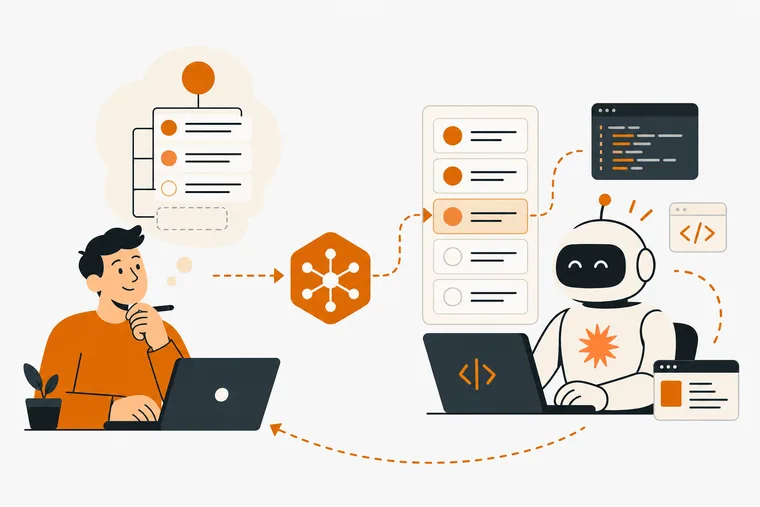
If you're already using Claude Code to write and ship software, you've probably noticed that the bottleneck is rarely the code itself. It's the gap between what you want the agent to do next and what it actually has in front of it. Claude Code productivity comes down to one thing: how cleanly you can hand off a queue of work to the agent and stay out of its way while it executes.
This article covers how AI task queues work, why context-switching between your to-do list and your coding agent is the real productivity leak, and how to structure your workflow so Claude Code can run longer sessions with less interruption from you.
Why Claude Code is changing how solo developers work
Claude Code's adoption has been fast. As of February 2026, SemiAnalysis estimated that Claude Code was authoring roughly 4% of all public GitHub commits, and projected that share would pass 20% of daily commits by the end of 2026.
Those numbers signal a shift in how code actually gets written, not just assisted. Developers aren't using Claude Code to autocomplete a line here and there. They're handing it entire tasks and walking away.
Anthropic's own research puts numbers to this behavior. A privacy-preserving analysis of around 400,000 interactive Claude Code sessions from around 235,000 people, between October 2025 and April 2026, found that in the typical session the user makes about 70% of the planning decisions while Claude makes about 80% of the execution decisions.
That split is the key insight. You plan. Claude executes. The workflow breaks down when those two activities are tangled together in the same moment. If you work alone, it breaks down harder: you are the only planner in the building, so every minute spent feeding the agent its next task is a minute not spent deciding what to build.
The real productivity leak: context-switching between lists and agents
Most developers running Claude Code still manage their task list somewhere separate — a markdown file, a Notion page, a mental queue. When the agent finishes a task, you stop what you're doing, check your list, copy the next task into the terminal, and restart. Each handoff is short on its own. Over a full day of active development, it adds up to something much larger: broken flow.
The deeper problem is that your to-do app was never designed to talk to an agent. It holds your tasks, but it can't surface them to Claude Code. So you become the bridge, manually carrying context from one tool to the other every time the agent needs direction.
That's the problem an AI task queue solves. Instead of copying tasks into a terminal prompt, you write them once into a structured queue the agent can read directly. It picks up the next task, works through it, marks it done, and moves on. You come back when the session is finished.
How an AI task queue actually works
An AI task queue is a structured list of work items that a coding agent can read and update without you acting as the middleman. The practical requirements are straightforward:
- Tasks must be machine-readable, not just human-readable
- The agent needs read access to know what to do next
- The agent needs write access to mark tasks complete or flag blockers
- The queue must be isolated from your personal to-do list so the agent can't accidentally touch unrelated work
That last point matters more than it sounds. If your agent can see your personal tasks, "buy groceries" and "fix the auth bug" live in the same namespace. Isolation isn't a nice-to-have — it's a basic requirement for safe autonomous operation.
The cleanest implementations use a protocol that lets the agent query the queue directly rather than parsing a text file. That's exactly what the Model Context Protocol (MCP) was designed for.
MCP: the protocol that makes task queues work with Claude Code
MCP is an open standard that lets AI coding agents connect to external tools through a defined set of read and write operations. When a task manager runs a local MCP server, Claude Code can query it like any other tool in its environment: ask for the next task, read its brief, update its status, and move on.
Dovilo runs a local MCP server on Desktop (Windows and macOS, Pro tier) that exposes nine tools to connected agents — three read operations and six write operations. The agent can read and update tasks, but it cannot create or delete them. That boundary keeps you in control of what goes into the queue while the agent handles execution.
The AI task queue in Dovilo is fully isolated from your personal to-do list. Your personal tasks are invisible to the agent. It only sees the single project you've scoped it to, with a brief that defines what it's working on. Your other projects stay invisible as well. Six clients are supported out of the box: Claude Code, Claude Desktop, Cursor, Windsurf, Codex CLI, and Gemini CLI. Any MCP-compatible client connects via JSON configuration — plain MCP, no lock-in to a specific agent.
The server runs locally inside the Desktop app over stdio. No task data is routed through a Dovilo endpoint. Only the agent's own model calls leave your machine.
Structuring a task queue for longer Claude Code sessions
The goal of a well-structured queue is to let Claude Code run for as long as possible without needing you to step in. Here's a practical approach:
Write tasks as briefs, not one-liners
A task that says "fix login" gives the agent almost nothing to work with. A task that says "the login form submits without validating the email field; add client-side validation before the POST request fires, and return a visible error message if the format is invalid" gives it a complete scope. The more context you put into the brief upfront, the less the agent needs to ask mid-session.
Sequence tasks by dependency, not priority
Within a session, the agent works the queue in order. If task three depends on the output of task two, they need to be adjacent and in the right sequence. Sorting by priority often scatters dependencies across the list. Sorting by dependency keeps sessions coherent.
Batch similar work into a single session
Context switching is expensive for agents too. If you have five UI tweaks and two API changes, run the UI tweaks in one session and the API changes in another. Mixing them forces the agent to reload different parts of the codebase repeatedly.
Use the queue as a session boundary
When you start a Claude Code session, the queue defines the scope. When the session ends, the queue reflects what was done. Over time, that record tells you how long certain types of tasks actually take — which is more useful than any estimate you could make upfront.
Staying in the loop without interrupting the agent
One of the harder parts of agentic development is knowing when to check in without breaking the session. A few patterns help:
Webhooks on task updates. When the agent marks a task complete or flags a blocker, a notification can fire to wherever you're already working. Dovilo's signed webhooks push those updates into Slack, Linear, n8n, or a custom endpoint when agent tasks change. You see progress without polling the queue manually. See the webhook docs for the payload format and signature verification.
Flagging blockers explicitly. If the agent can't proceed, it sets the task to awaiting-user and stops instead of guessing. You check the queue once, see what's blocked, and unblock it in a single pass.
Reviewing completed tasks in batches. Instead of reviewing each task as it finishes, let the agent run through a full batch and review the results together. This keeps you in planning mode rather than review mode — which matches the 70/20 split the research describes.
What Dovilo doesn't do yet
Two things worth knowing before you build a workflow around this:
There's no data export yet — not for AI tasks, not for your personal tasks or focus history. If you want to archive completed agent tasks or pipe them into another system, webhooks are currently the only way out.
The MCP server is local only. The agent runs where Dovilo Desktop runs. There's no remote MCP endpoint, so you can't point a cloud-based agent at it from a different machine. Both of these are on the roadmap, but they're not available as of September 2026.
Agent tasks also run on a monthly quota of [CONFIRM: NUMBER] tasks. One-time top-up packs of +10, +30 and +75 start at $0.99 and never expire.
Putting it together
Claude Code productivity isn't about prompting faster. It's about reducing the number of times you have to stop, reorient, and hand something off manually. A structured AI task queue removes the most common interruption in agentic development: the moment when the agent finishes one thing and has nothing to pick up next.
Write better briefs. Sequence by dependency. Let the agent run. Check in through notifications rather than interruptions. That's the workflow.
If you want to try this with Dovilo, the MCP server is part of Dovilo Pro: $2.49/month, $19.99/year, or $49.99 as a one-time lifetime purchase. The 7-day free trial starts in the iOS or Android app — install Dovilo on your phone, start the trial, then sign in on Desktop with the same account and connect your first agent. Nothing is charged if you cancel before day 7.
Frequently asked questions
What is an AI task queue in the context of Claude Code? An AI task queue is a structured list of work items that Claude Code can read and update directly, without you copying tasks manually into the terminal. The agent picks up the next task, executes it, marks it done, and continues. A local MCP server is the most reliable way to connect a task manager to Claude Code.
Does the agent see my personal to-do list? In Dovilo, no. The AI task queue is fully isolated from your personal tasks. The agent only sees the one project you've scoped it to, with a brief that defines what it's working on. Your personal My Tasks list is not on the tool surface.
What MCP clients work with Dovilo's local server? Claude Code, Claude Desktop, Cursor, Windsurf, Codex CLI, and Gemini CLI are all supported. Any MCP-compatible client can connect via JSON configuration — plain MCP, no lock-in to a specific agent.
Is the MCP server cloud-based? No. The server runs locally inside Dovilo Desktop over stdio. No task data passes through a Dovilo endpoint. Only the agent's own model calls leave your machine.
Which tier includes the MCP server? The MCP server is part of Dovilo Pro, on Desktop (Windows and macOS). Pro is $2.49/month, $19.99/year, or $49.99 as a one-time lifetime purchase. The 7-day free trial is started in the iOS or Android app, not on Desktop — start it on your phone, then sign in on Desktop with the same account. Nothing is charged if you cancel before day 7.
How do I know when the agent has finished a task? Dovilo's signed webhooks fire into Slack, Linear, n8n, or a custom endpoint when agent tasks are updated. You get a notification when a task is marked complete or flagged as blocked, without needing to check the queue manually.
Can I use Claude Code with other task managers that have MCP support? Yes. Todoist ships an official MCP server at ai.todoist.net/mcp, and Linear ships one too. The right tool depends on your workflow. Dovilo's specific combination is a local-first, agent-only task surface with an isolated queue and a gamified progress layer — a different design from a general project management tool.