Pick your client, restart it: your agent has a task list
Dovilo Desktop bundles a local MCP server over the task list you keep for AI coding
agents. In Settings → AI you switch the server on and open
Connect AI, which generates the right config for the client you pick:
Claude Desktop in one click, Claude Code, Cursor CLI, Codex CLI and Gemini CLI with a
single mcp add command. Restart the client and it sees Dovilo. The agent
works the AI tasks you wrote for it — never your own to-do list — and cannot
create or delete tasks.
Windows & macOS · the bridge ships inside the app, so there is no npx and
no separate runtime · part of Dovilo Pro, whose 7-day free trial
starts in the iOS or Android app.
- Claude Desktop One click Connect AI generates the config for you.
-
Claude Code
One command
Connect AI hands you a single
mcp addline. -
Cursor CLI · Codex CLI · Gemini CLI
One command
A single
mcp addcommand, generated for each. - Cursor (GUI) · Windsurf · any other MCP client One paste A JSON snippet, generated for you. The fallback, not the default.
The MCP API key is generated locally on your machine and never leaves it unless you copy it into your client.
That is the whole check.
The nine tools your agent gets
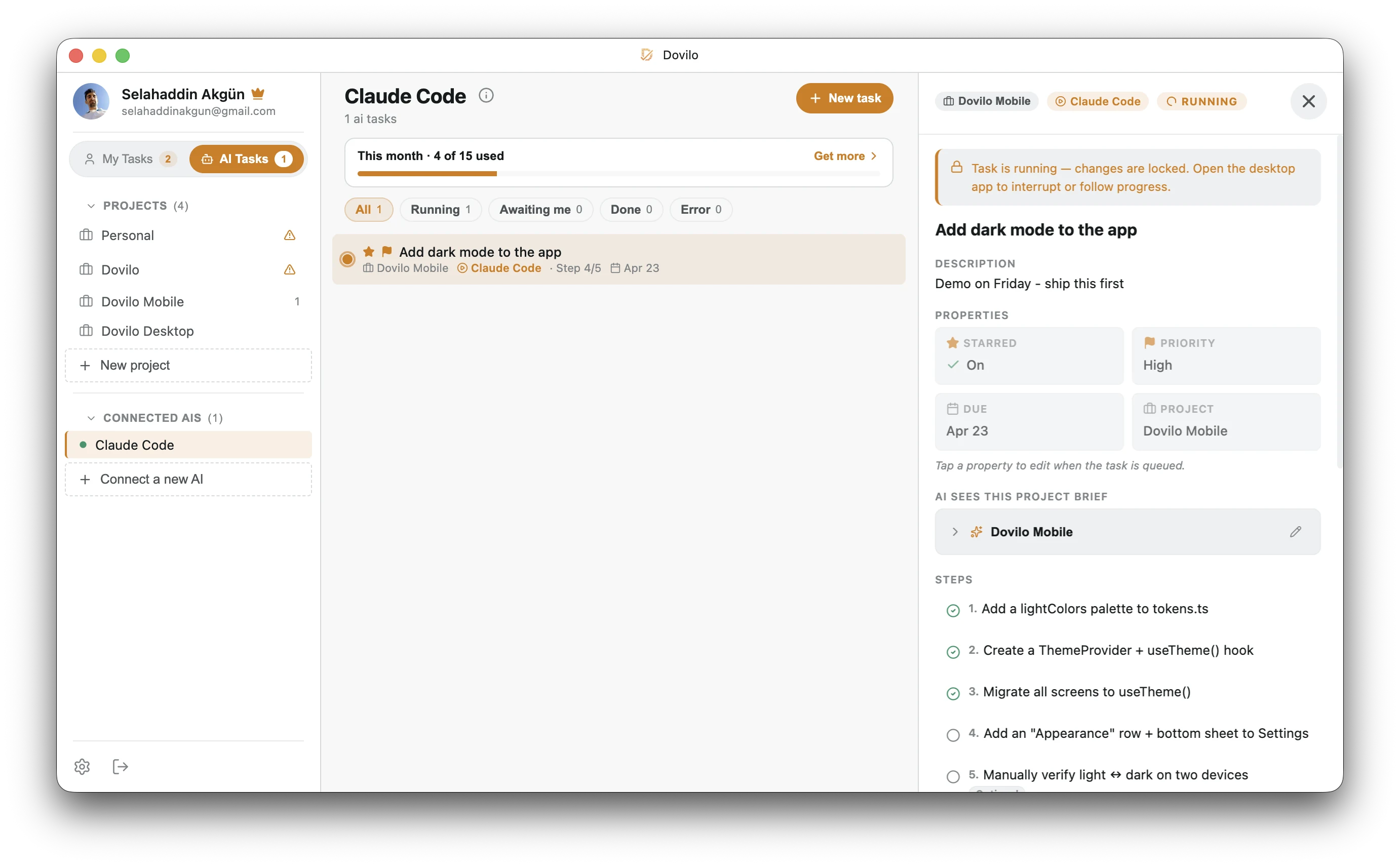
An agent working an AI task in Dovilo Desktop. The same view is a tab in the mobile app — live, while it runs.
Local, not cloud
The server runs on your machine and listens on a local port. Task data does not leave the device for an agent to work on it.
Its own tasks, nothing else
An agent sees AI tasks only — the ones you write for it in the AI Tasks tab, in the project it is scoped to. Your personal to-do list lives on a separate surface it cannot reach, and the project brief bounds what it is told.
Read and update only
There is no create-task tool. An agent moves status, marks steps, appends notes and telemetry. Turning MCP off in Desktop settings drops every live agent connection.
Plain MCP, no lock-in
Presets exist for the usual clients, but the transport is the open protocol — anything that speaks MCP connects with the generic snippet.
Go deeper
A working receiver, a walkthrough, and the payload spec
Nothing here is gated — read the whole integration, before or after you install.
Getting started
Three steps, and only the first one takes time
Most of it is the download. Connecting the client is: switch the MCP server on, pick your client, restart.
Install Dovilo Desktop
Windows installer · macOS disk image · all builds. Sign in with the account you use on mobile.
Desktop is part of Pro, and Pro starts with a 7-day free trial you begin in the iOS or Android app — the same subscription unlocks Desktop, the MCP server and webhooks. Cancel inside the week and you are not charged. What it costs after that.
Switch the server on and pick your client
Settings → AI: turn the MCP server on, then open Connect AI
and pick your client. Dovilo generates the right config for it, you restart the client, and
it sees Dovilo as an available MCP server. The bridge ships inside the app — there is
nothing else to install, no npx, no separate runtime.
- Claude Desktop One click Connect AI writes the config and wires it up for you.
-
Claude Code
One command
A single
mcp addline, generated for you to paste. -
Cursor CLI · Codex CLI · Gemini CLI
One command
A single
mcp addcommand, generated for each. -
Cursor (GUI) · Windsurf · any other MCP client
One paste
A generated JSON snippet — the generic
mcpServersentry, with the bridge path and your local API key already filled in.
Write an AI task and hand it over
Agent work lives in its own place: create a project, write a short brief (goals, constraints, what to leave alone), then add the job in the AI Tasks tab. That tab is the entire surface an agent can read — your personal to-do list in My Tasks is never exposed to it, so nothing you keep there needs excluding.
AI Tasks is on the phone as well as the desktop, and writing a task there works the same on both. Queue the work from your phone on the way in; the agent picks it up on the machine running Desktop.
Then ask your agent for the work in plain language — it discovers the tools on its own.
Every one of those lands on the task itself, so the same AI Tasks tab on your phone shows
the step trail, the notes and the cost while it happens. If the agent needs a decision it
sets awaiting-user and stops.
Tool surface
Nine tools, and the ones that are missing
Three read, six write — and none of them create or delete a task. Every one of them operates on AI tasks only: the agent works the jobs you wrote for it, it does not read your to-do list and does not grow its own queue behind your back.
| Tool | Access | What it does |
|---|---|---|
list_tasks | read | Lists the AI tasks in the project it is scoped to, with their status. Personal to-do items are not in this list. |
get_task | read | One AI task in full: description, steps, notes, telemetry. |
read_context | read | The project brief and context that task carries — goals, constraints, conventions. |
update_status | write | Moves the task through queued → running → awaiting-user → done, or failed / cancelled. |
update_step | write | Marks a step in the plan as started or finished. |
add_step | write | Appends a step the agent discovered along the way. |
skip_step | write | Skips a step that turned out to be unnecessary. |
append_note | write | Writes a note onto the task — what it did, what it decided, what it could not do. |
append_telemetry | write | Reports model, tokens, cost and duration for the run. |
What an agent cannot do
- Read your personal to-do list — My Tasks is not on the tool surface at all.
- Create a task, or delete one.
- See AI tasks outside the project it is scoped to.
- Keep working after you switch MCP off — connections drop immediately.
Clients with a preset
Claude Code · Claude Desktop · Cursor · Cursor CLI · Windsurf · Codex CLI · Gemini CLI.
Everything else that speaks MCP connects with the generic snippet. The bridge is a local process started by your client over stdio; there is no Dovilo endpoint on the internet for it to reach.
Outbound
Signed webhooks for everything that isn't an agent
Webhooks are optional. Nothing in the MCP path needs them — an agent connects, reads its task and reports back without a single signed request. This section is the other direction: MCP is how an agent reaches in, webhooks are how Dovilo reaches out — to Slack, Linear, n8n, a LangGraph app, or your own service.
The contract
task.created,task.status_changed(carriespreviousStatus), andwebhook.pingfrom the test button.X-Dovilo-Signature: t=<unix ms>,v1=<hex>— HMAC-SHA256 over{t}.{rawBody}, 5-minute replay window.X-Dovilo-Deliveryis stable across retries: use it as the idempotency key.- Up to 5 retries at 5s, 30s, 2m, 10m, 1h. FIFO per task.
410 Gonedisables the subscription. - Payloads are deliberately slim — fetch the heavy fields through MCP
get_task.
Why both
A webhook tells your system that a task moved. MCP is how the agent then reads the task, does the work and reports back. The LangGraph demo is exactly that loop, end to end, in code you can run.
The signing secret is shown once at generation, lives in OS-level secure storage on the desktop client, and is never synced.
Trying it · pricing
Free for a week, then $2.49 a month
The agent layer lives in Dovilo Desktop, which is part of Pro. Being straight about how the trial works, because it matters if you install first and decide later.
How to try it without paying
- Start the 7-day free trial in the iOS or Android app.
- Install Dovilo Desktop on Windows or macOS and sign in with the same account.
- Connect your client and run a task. Cancel before day 7 and nothing is charged.
The trial runs through your App Store or Google Play subscription, so it starts on your phone and a payment method is attached there — there is no card-free desktop-only trial today. Everything else about the agent layer is unlocked for the full week.
After the trial
- $2.49 / month, $19.99 / year, or $49.99 once, forever.
- Pro covers cloud sync, Desktop, the MCP server and webhooks — the agent layer is not a separate SKU.
- Agent tasks run on a monthly quota; one-time top-up packs start at $0.99 (+10, +30, +75) and never expire.
- Store pricing is regional; the numbers above are the USD baseline.
Straight answers
Questions you would ask before installing
How hard is this to set up?
Two things: install Dovilo Desktop and sign in, then open Settings → AI,
switch the MCP server on and hit Connect AI. Pick your client and Dovilo
generates the right config for it — Claude Desktop is auto-wired in one click; Claude Code,
Cursor CLI, Codex CLI and Gemini CLI get a single mcp add command; Cursor (GUI),
Windsurf and custom MCP clients get a JSON snippet to paste. Restart your AI client and it
sees Dovilo as an available MCP server. The bridge ships inside the app, so there is no
npx and no separate runtime, and the API key is generated locally on your
machine.
Does any of this go through your servers?
No. The MCP server runs on your machine and listens on a local port; Dovilo does not transmit MCP traffic anywhere. The one external flow is whatever your agent sends to its own model provider, which is between you and that provider. Cloud sync for the task list itself is a separate, optional Pro feature.
Can an agent read my whole to-do list?
No, and this is the part worth being precise about. AI tasks and personal tasks are two separate surfaces in Dovilo. An agent reads the AI tasks you wrote for it in the AI Tasks tab, inside the project it is scoped to — nothing in My Tasks is exposed to the tool surface, so there is no list to exclude and no filter to get wrong.
Can an agent create tasks or delete my data?
No. There is no create or delete tool. On the AI tasks it can see, it updates status, steps, notes and telemetry — that is the whole write surface. Switching MCP off in Desktop settings terminates active connections immediately.
What stops it touching the wrong project?
Scope is per project: an agent reads the AI tasks of the project it is connected to, and that project's brief defines what it is told about the work.
Does it work with something other than Claude and Cursor?
Yes. Presets cover Claude Code, Claude Desktop, Cursor, Cursor CLI, Windsurf, Codex CLI and Gemini CLI; any other MCP client connects with the generic JSON snippet. It is the open protocol, not a vendor integration.
Do I have to be at my desk to use it?
Only the agent does. AI Tasks is a tab in the mobile app too: you can write a task there, watch the agent move through its steps in real time, and read the notes and the token/cost telemetry it leaves — from the phone, while the run happens on the desktop machine.
Can I connect from another machine?
Not today. The server is local to Dovilo Desktop, so the agent has to run on the same machine — that is the trade for keeping task data off the network. A remote MCP server is on the roadmap; it is listed in the changelog so you can watch for it.
Can I get my data out?
Not yet — there is no export today, and it would be dishonest to imply otherwise. It is on the roadmap; the changelog is where it will show up when it ships.
Who builds this
One engineer, in Istanbul
Dovilo is built by Selahaddin Akgün — 14 years of production software, most recently as a lead engineer, and before that leading Android engineering at stc pay. Dovilo is a solo project: I write the app, the desktop client, the MCP bridge and this page.
The agent layer exists because I wanted my own coding agent to work a real task list instead of a scratch file — and none of the mainstream task managers ship an MCP server of their own. If something here is wrong or missing, mail supportdovilo.app and you will reach the person who wrote it — one desk, not a ticket queue.
sakgun.com · LinkedIn · Release notes
The rest of Dovilo is a to-do app with focus sessions and a city that grows out of finished work — the agent layer sits on top of that. See the app →